
New Recurring Due Dates Feature in Trello!
You might not need recurring card automations or Card Repeater Power-Up anymore!

Trello’s just added a new feature that will help you manage your recurring tasks. No automation or Power-Ups needed!
Keep reading to see how it works:

Special shoutout to my premium sponsors!
Thanks to:
Trello Consulting done differently
Amazing Fields
Build custom workflows with extra data for cards with formulas, formatting, styling, custom fields, and everything else you could imagine needing to make Trello do your bidding.Turn Trello into a business hub with robust Power-Ups for recruitment, customer support, employee directory, knowledge base and more.
The best all in one power-up for planning, tracking and managing work across boards. Use extended board, reports, master boards, Gantt views and card mirroring across boards.
Unito
With Unito you can easily connect Trello to your other business critical apps with live bi-directional sync. In just a few minutes you can create your first flow, no coding or technical resources needed. Try it free today.Sendboard - Email for Trello
Organize & automate your Email in Trello. Connect any Trello board with Gmail, Outlook, Yahoo & more.Do more and enhance your Trello experience with the Handy Power-Ups Pack! Discover a variety of Power-Ups designed to boost your and your team’s productivity. Try them out with a free trial and experience the difference today!
2-Way Card Mirror & Sync by FullZinc
Sync cards across boards and workspaces! Any edits to one card will be automatically mirrored to any other cards.
Log Work – Time Tracking & Reporting for Trello
Easily log time on cards and build custom reports across multiple boards by users, boards, or any custom field. Powerful, flexible, and built to fit your workflow. Unlock more advanced functionality when used together with Any Fields Power-Up.
Taco’s hungry!
Got a burning question about Trello? An impossible mission you want to accomplish in your favorite tool? Submit your question and maybe it’ll be featured next week!

🔁 Repeating Due Dates Now Available
I’ve been often asked about best practices for creating cards that need to repeat weekly. You have a task that you want to repeat daily, weekly, monthly, etc. And you don’t want to copy the card and adjust the due date, so how do you handle it??
The OG solution is the Card Repeater Power-Up. It had a confusing start, because it basically copied cards and folks struggled to find the original when they wanted to shut it off, but it did the job for folks.
Then came automation, which really blew my mind and let me create exactly the type of recurring cards and tasks that I needed, with all the customization that I wanted (like dynamic due dates, updated card names to include the week number, and more!)
While the automation has been my favorite route, not everyone wants to build out Trello automation rules as much as I do 😬
So I’m thrilled that Trello has launched a new way to create recurring due dates, without requiring a Power-Up OR building fancy automation.
When you select the Due Date on a card, you’ll see a new “Recurring" option below:
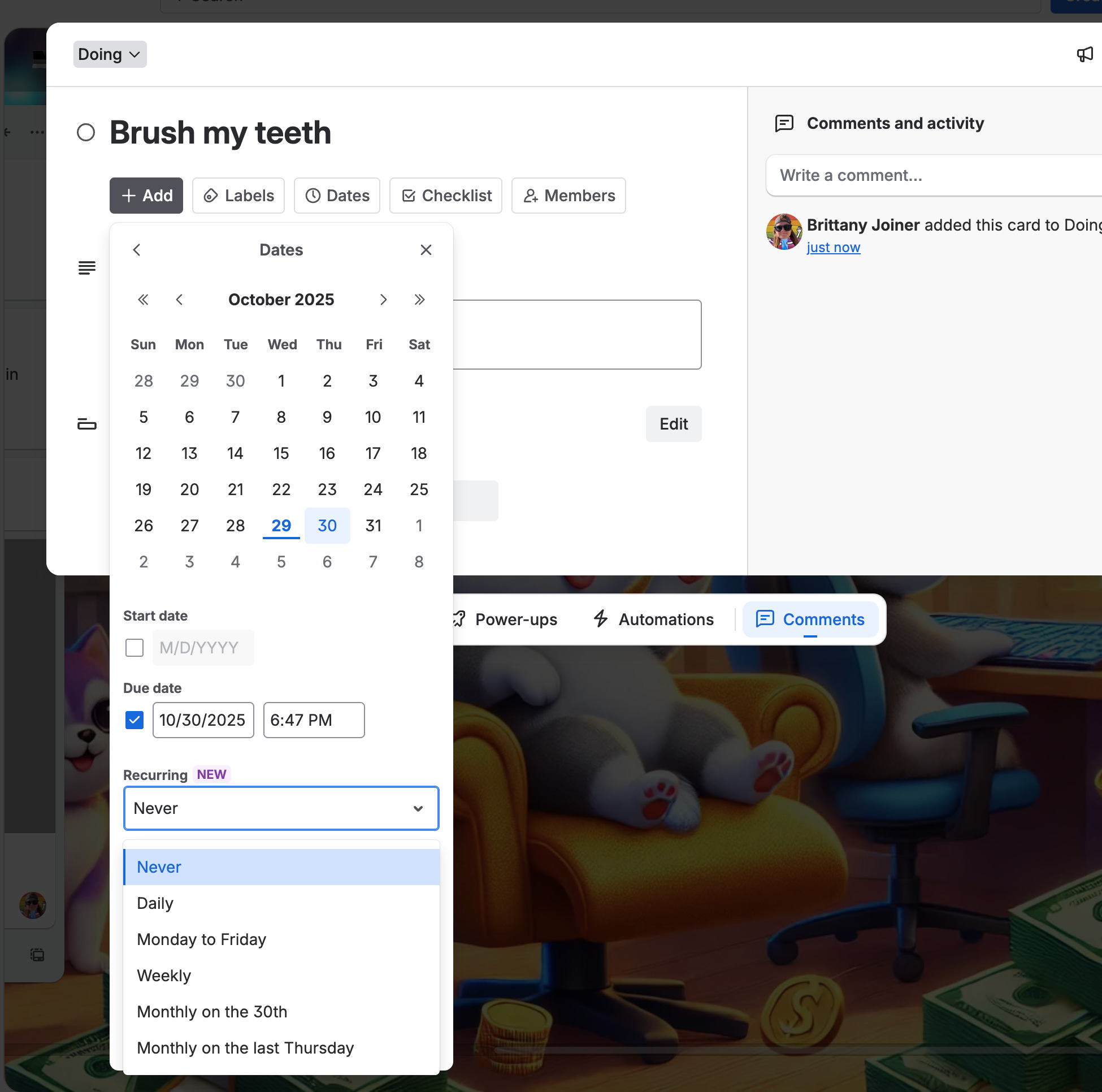
Click that dropdown and you can see a handful options so that a specific task can adjust its due date once it’s been completed!
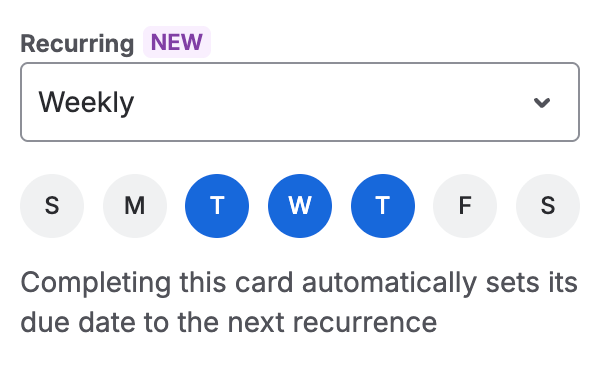
And you can get custom with it too. For instance, maybe you want it to repeat every Tuesday, Wednesday, and Thursday. Click the Weekly option and choose the days you want it to recur.
Once I complete the card (click that circle on the card), it resets the due date:
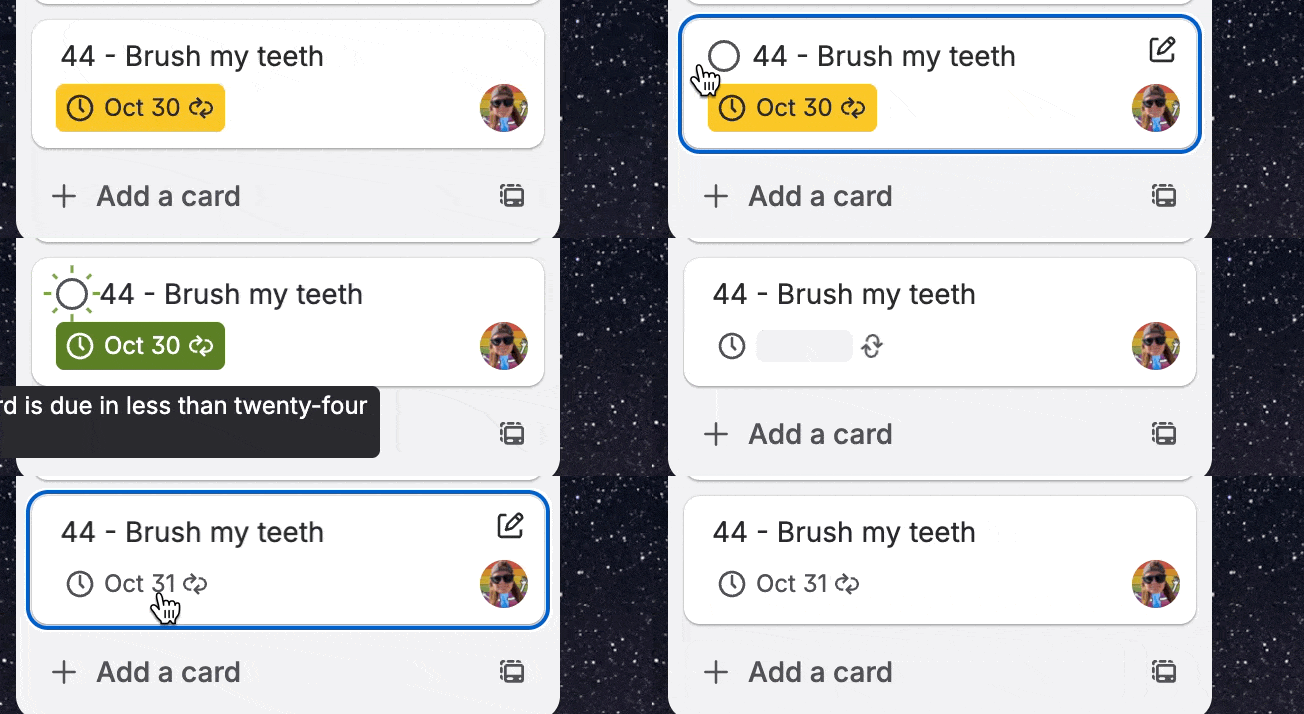
(Don’t worry, dentist, I promise I brush my teeth more than just Tuesday, Wednesdays, and Thursdays. I do Fridays, too! 😜)
I previously wrote about how I organize all my recurring adulting things with a Trello board that handles what day it was done and logs that to then reset the due date to the frequency I want. It’s great, but requires a lot of automation and this new simple features solves about 85% of it, just by letting you say how often you want to do a task, no automation required!
And it’s great for business use cases too, like reminders for creating reports, checking in with your direct reports, prepping for meetings, or other tasks that need to happen on a recurring basis.
So how are you planning to use this? Drop a comment or reply back to this message and let me know!
👔 Pro tip:
Did you know you can open the due date menu by pressing “d” when you have a Trello card open? 🤔

When you’re ready, here’s how I can help you
🤓 Need 1:1 help with Trello? I offer consulting on a limited basis, but I have a network of colleagues who can also support you! Fill out this form if you’d like to book a time for help with Trello.
📚 Looking for a 1-stop Trello resource? Check out my book, Supercharging Productivity with Trello. You’ll find everything you need, whether you’re getting started or taking Trello to the next level. Bonus - reply back to this email with your receipt, and I’ll send you some bonus video content going through each part of the book.
Ready to level up your Trello game? Whether it’s keeping track of your personal tasks or wrangling your teams at work, Trello is your tool—you just might need some guidance on how to best set it up.
For less than a cup of coffee, you can get premium templates and guides, bonus Trello tips, and direct access to monthly Q&A calls with me.
👉 Join the Trello supernerds here: trello.substack.com/subscribe
Thanks for reading!! I’ll see ya next week 👋
Where is the option for Bi-Weekly option - I have a task that recurring every other Monday?