
When would I use recurring due dates in Trello?
Need some inspo on this new feature?

Happy Thursday, last week I showed you the HOW of Trello’s new feature with recurring due dates. Today, I’ll show you some inspo for WHY. But first, let’s look at copying cards without custom fields, and announce my next livestream, which might make you wonder if it’s still Halloween, or already April Fools.
🌮 Dear Taco
This is a section where readers can submit their Trello questions, and each week I’ll pick one and answer it! It’s like “Dear Abby” but make it trello. Have a question you want to submit? Share it here.
Hello Brittany, I am looking for a way to clear all custom fields at once. The need is to copy a card from one Board to another, and I want to avoid that custom fields from Board 1 are added to Board 2. Right now I clear them one by one in Butler. But since I have quite a few, I had to cut my Butler Rule into 2 because I hit the limit on the number of instructions…
~Eric Bouchet
Hey Eric! First of all, if you’re using automation A LOT, I recommend being a Premium subscriber, which will help you avoid any limits!
Second of all, as far as clearing fields, there’s not a better way that I know of besides what it sounds like you’re doing where you use the “clear custom field” action and just keep stringing them together. If you’re looking for a “for each custom field, clear it” action, that doesn’t exist.
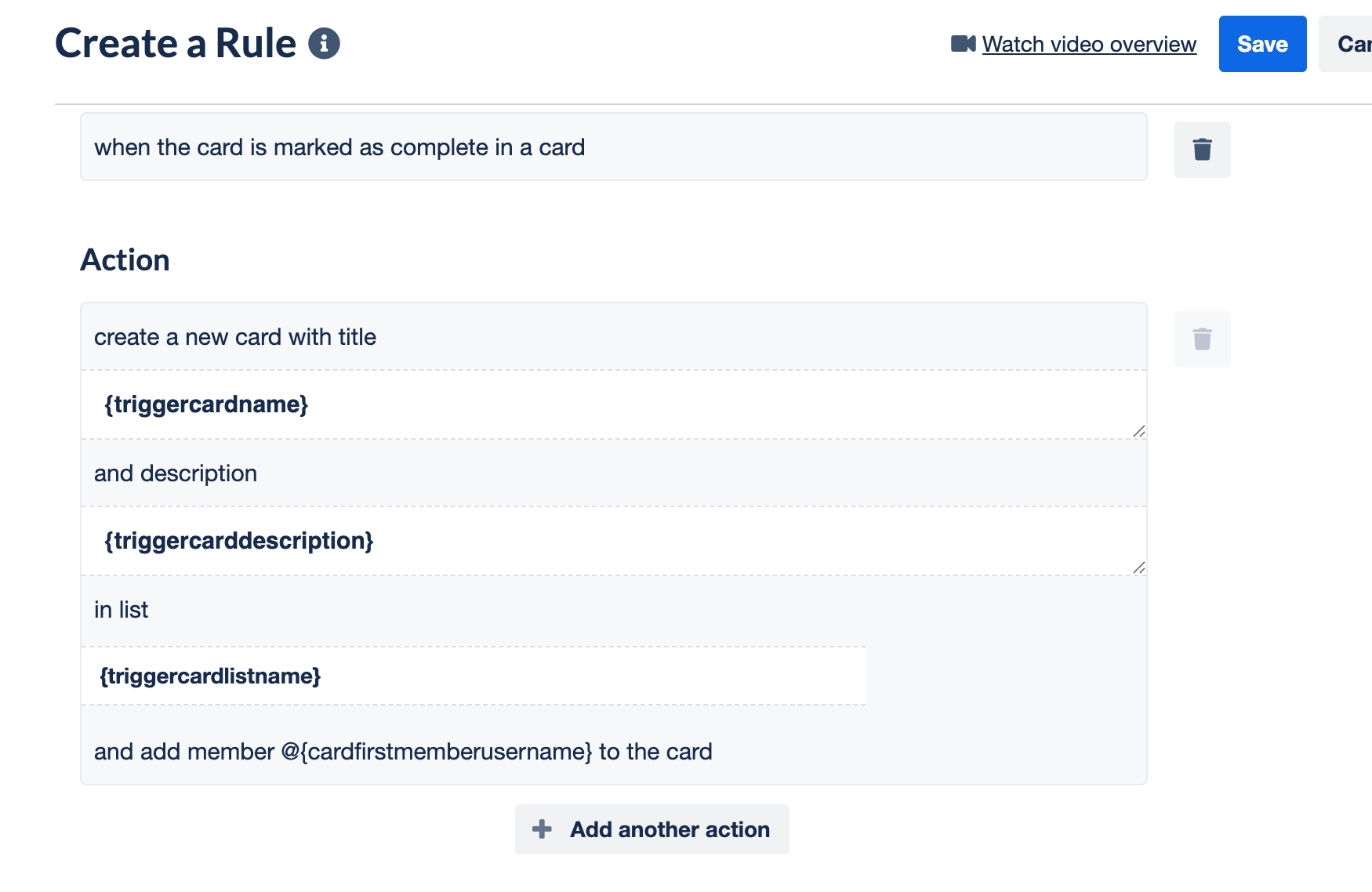
Another option you might be interested in… just create a new card and only pass over the attributes you want, instead of copying a card.
For instance, you can still reference content from an existing card when creating a new card, by using Butler Variables.
Want to submit your question? Maybe it’ll be featured next week!

Special shoutout to my premium sponsors!
Thanks to:
Trello Consulting done differently
Amazing Fields
Build custom workflows with extra data for cards with formulas, formatting, styling, custom fields, and everything else you could imagine needing to make Trello do your bidding.Turn Trello into a business hub with robust Power-Ups for recruitment, customer support, employee directory, knowledge base and more.
The best all in one power-up for planning, tracking and managing work across boards. Use extended board, reports, master boards, Gantt views and card mirroring across boards.
Unito
With Unito you can easily connect Trello to your other business critical apps with live bi-directional sync. In just a few minutes you can create your first flow, no coding or technical resources needed. Try it free today.Sendboard - Email for Trello
Organize & automate your Email in Trello. Connect any Trello board with Gmail, Outlook, Yahoo & more.Do more and enhance your Trello experience with the Handy Power-Ups Pack! Discover a variety of Power-Ups designed to boost your and your team’s productivity. Try them out with a free trial and experience the difference today!
2-Way Card Mirror & Sync by FullZinc
Sync cards across boards and workspaces! Any edits to one card will be automatically mirrored to any other cards.
Log Work – Time Tracking & Reporting for Trello
Easily log time on cards and build custom reports across multiple boards by users, boards, or any custom field. Powerful, flexible, and built to fit your workflow. Unlock more advanced functionality when used together with Any Fields Power-Up.

Ready to level up your Trello game? Whether it’s keeping track of your personal tasks or wrangling your teams at work, Trello is your tool—you just might need some guidance on how to best set it up.
For less than a cup of coffee, you can get premium templates and guides, bonus Trello tips, and direct access to monthly Q&A calls with me.
👉 Join the Trello supernerds here: trello.substack.com/subscribe
🛎️ Newbie tips (And Automation Tips!)
Term of the week
Triggers: events that launch automations in Trello. There are several types, from Rules (events that happen on a board/card, like a card being added, or a date being changed, member being added, etc) to Scheduled (recurring dates, like every monday or on the first of the month) to Due Dates (a current date related to a due date, ie, something due a week from today or within the next 30 days), and “manual” ones, aka when you click a button on a Card or Board.
Tip of the week
When you want to automate something in Trello, before you even open the automation tools, try to write in plain english what you want to happen, specifically using “when” and “then” language.
“When I add a card to a board, then set the due date to a week from today.”
This helps you understand what trigger you’ll need to use.

💡 Inspiration and ideas
Did you see the latest updates in Trello? You can now set recurring due dates without any Power-Ups or Automation required!
If you’ve already been doing this via Automation or Card Repeater Power-Up, then you know exactly where you’ll use this new feature.
But if you haven’t, you might be drawing a blank. Here are some ideas!
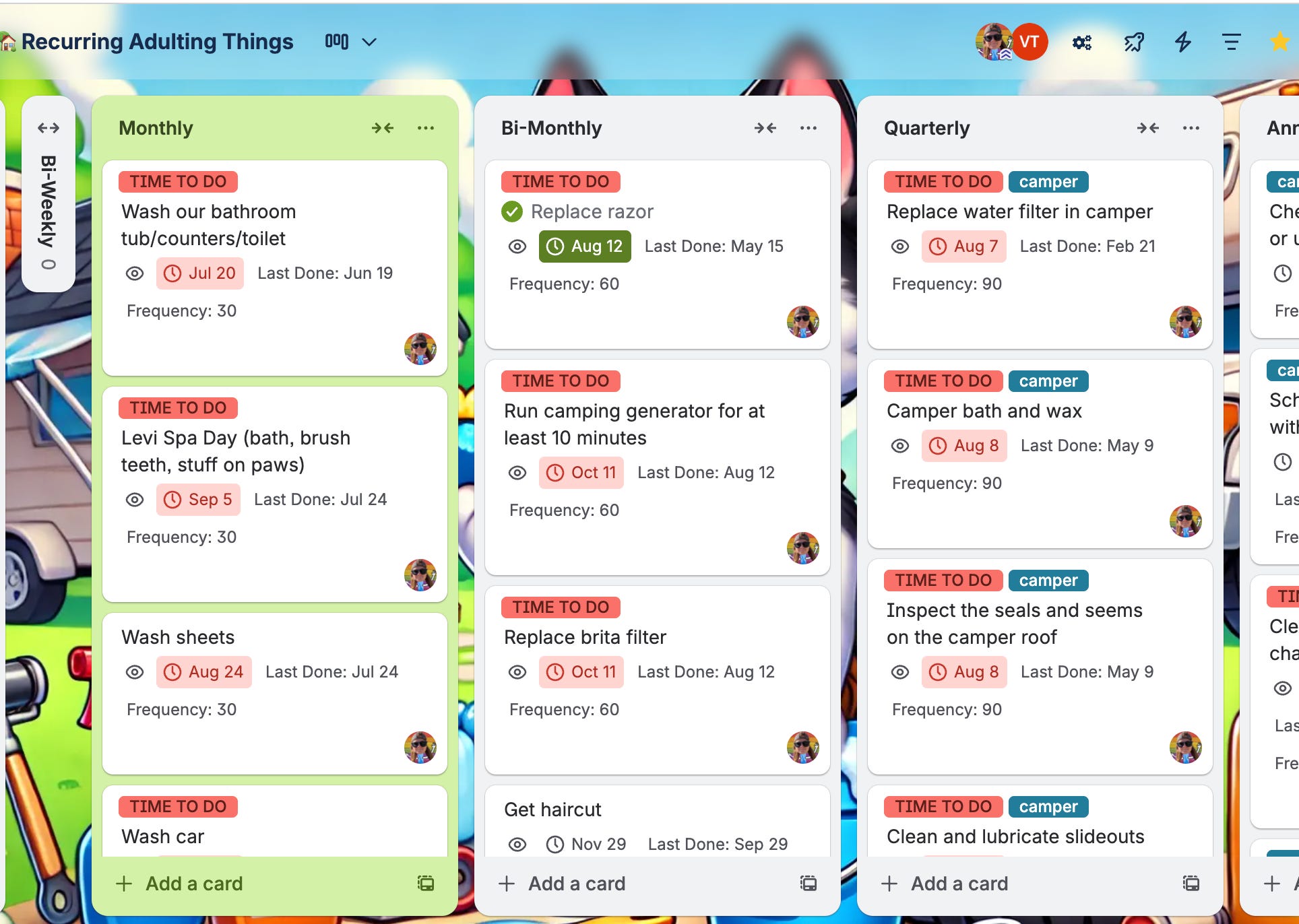
Recurring Chores or “Adulting Things”
I have a pretty robust system that I created with automation (before this feature) to help me create due dates for certain chores that happen in specific intervals.
Weekly Meetings
Set recurring weekly due dates for agenda items in meetings so that you can check it off, and still have it queued up for next week.
Event Reminders
Sure you can use a Google Calendar, but if your calendar is busy, or if you want to remember to DO something (like actually wish someone a happy birthday), you can create a Trello board of these recurring events, and check it off when you’ve completed it so there’s no more wondering “did I actually send them a card for their birthday?”
What are you using your repeating/recuring cards or due dates for? Comment below and I’ll help you sort out if it could work with this new feature!
Hey dear Brittany 😊👋
Most of the time, to be honest I have used recurring dates via Power Up Card repeater, but for just a few business things and a lot of personal chores things.
Your article about the initial tough start of the Repeater Power Up is to the point indeed.
Multiplication of cards (visual multiplication) makes it really hard to navigate sometimes.
But even when there is visual multiplication, IF the cards could be filtered or separated , based on the current active date of the sequence each time, it would be great 😃
Anyway now this feature seems more neat and friendly.