
You can now preview checklists without opening a card
Plus exciting Chrome Extension updates for checklists!

Greetings from Lexington, KY. 😻
Speaking of CATS…my cats have gotten so comfortable with the camper, they’ve started inviting friends to the campfire I guess?
Okay lets jump into Trello!
🎉 You can now preview checklists without opening a card
This one’s small but it’s going to save you so much back-and-forth.
Trello added a new way to peek at your checklist items right from the card front. No opening the card, no loading the full view. You just click the checklist progress bar and the items pop up right there. Check something off. Click again to close it. Done.
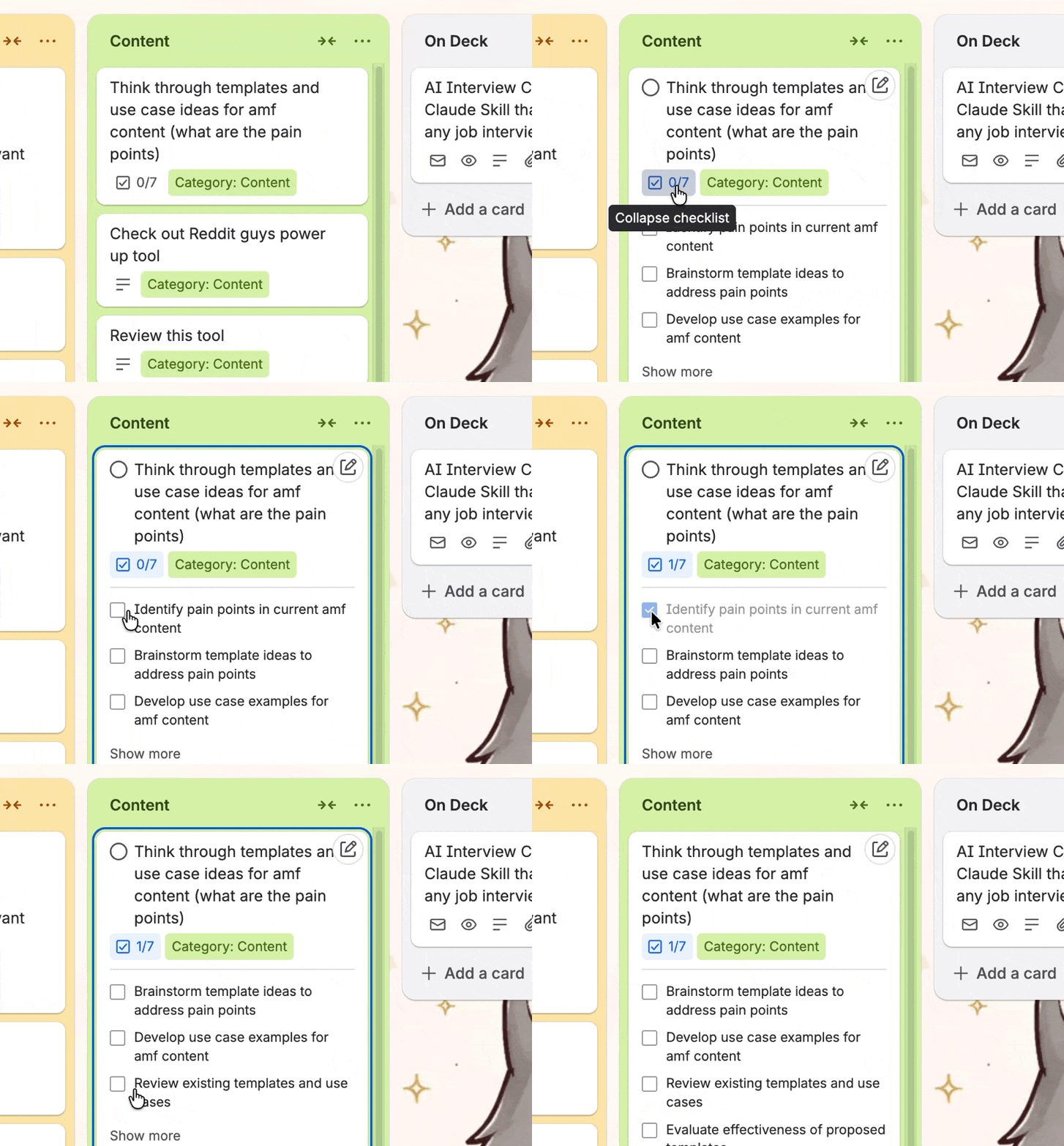
If you’ve ever found yourself opening a card just to see what was left on a list, or to check one thing off before closing it again, this is for you. It sounds like a tiny thing. It doesn’t feel tiny when you’re actually moving through a board.
Pro tip: this works great if you use checklists as quick task lists inside a bigger project card. You can keep the board view and still act on items without breaking your flow.
I need your help building a Wall of Trello Love 🧱
As part of some rebrand updates I’ve been working on, I’m putting together something I’m calling the Wall of Trello Love. Basically, a collection of quotes from people who’ve found my content helpful.
And I’m asking you for one.
If something I’ve shared has ever saved you time, helped you actually understand Trello, or given you a system that works for your brain... a quote is a free and genuinely meaningful way to say thanks. It takes a few minutes and it helps me more than you’d think!
Here’s how it works: I built a Fillout form that feeds directly into a Trello board. You fill it out, it creates a card with your quote, and then I use Shareables to pull those quotes off the board and display them as polished graphics on a page.
I want to walk you through this process on purpose, because this is actually something any small business owner could set up.
A form that creates Trello cards.
Shareables to display them beautifully.
The whole thing is replicable if you want to build your own testimonial wall or social proof system.
So yes, I’m asking for a quote. But I’m also showing you a workflow while I do it!
✔️ Chrome extension update: bye-bye strikethrough
Premium subscriber Dee Beck asked whether there was a way to hide the strikethrough styling that Trello applies to completed checklist items. It always crossed out the text when you checked something off, which some people find distracting or just visually annoying.
So I added it to my Chrome Extension for collapsing checklists!
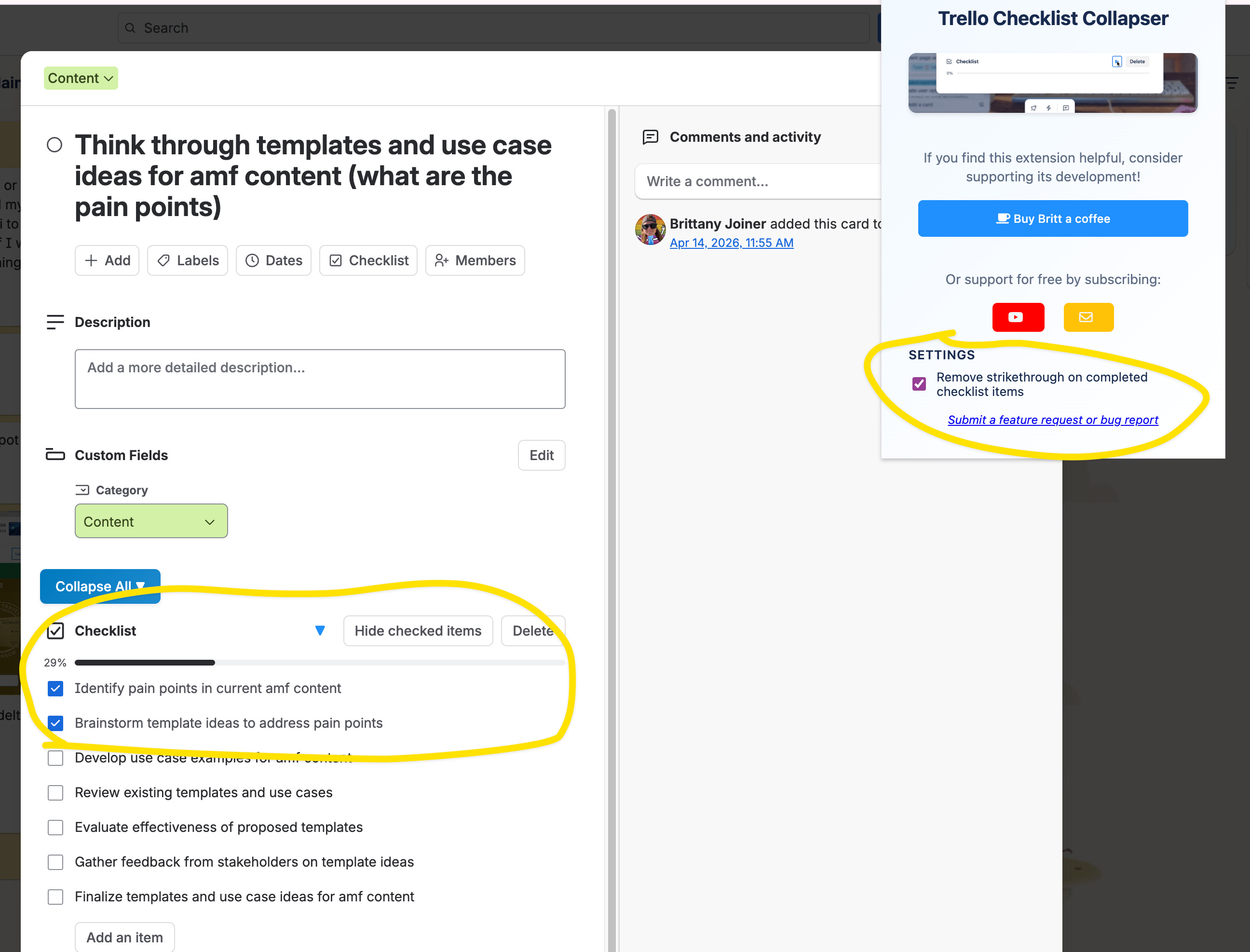
You can now toggle that strikethrough off in my Chrome extension. The item gets marked complete, but the text stays clean and readable.
If you don’t have the extension yet, grab it here. It’s free!
Special shoutout to my premium sponsors!
Thanks to:
Trello Consulting done differently
Amazing Fields
Build custom workflows with extra data for cards with formulas, formatting, styling, custom fields, and everything else you could imagine needing to make Trello do your bidding.Turn Trello into a business hub with robust Power-Ups for recruitment, customer support, employee directory, knowledge base and more.
The best all in one power-up for planning, tracking and managing work across boards. Use extended board, reports, master boards, Gantt views and card mirroring across boards.
Unito
With Unito you can easily connect Trello to your other business critical apps with live bi-directional sync. In just a few minutes you can create your first flow, no coding or technical resources needed. Try it free today.Sendboard - Email for Trello
Organize & automate your Email in Trello. Connect any Trello board with Gmail, Outlook, Yahoo & more.Do more and enhance your Trello experience with the Handy Power-Ups Pack! Discover a variety of Power-Ups designed to boost your and your team’s productivity. Try them out with a free trial and experience the difference today!
2-Way Card Mirror & Sync by FullZinc
Sync cards across boards and workspaces! Any edits to one card will be automatically mirrored to any other cards.
Log Work – Time Tracking & Reporting for Trello
Easily log time on cards and build custom reports across multiple boards by users, boards, or any custom field. Powerful, flexible, and built to fit your workflow. Unlock more advanced functionality when used together with Any Fields Power-Up.
📚 Looking for a 1-stop Trello resource? Check out my book, Supercharging Productivity with Trello. You’ll find everything you need, whether you’re getting started or taking Trello to the next level. Bonus - reply back to this email with your receipt, and I’ll send you some bonus video content going through each part of the book.
Thanks for reading!! I’ll see ya next week 👋